

Affiliate disclosure: This post contains affiliate links. If you make a purchase through them, Smart Ops may earn a commission at no extra cost to you.
If the idea of automating your social media makes you uncomfortable, you’re probably not worried about the technology.
You’re worried about what happens to your voice.
Will your posts start sounding generic? Will your audience notice that everything is scheduled? Will automation turn your business into another account that posts regularly but feels strangely absent?
It doesn’t have to.
I felt this exact hesitation myself before I started scheduling Smart Ops’s own Pinterest content — the worry that “scheduled” would somehow read as “impersonal” to anyone who noticed. It hasn’t. What changed wasn’t the automation; it was being deliberate about what I automated and what I didn’t.
The goal of learning how to automate social media posting isn’t to make your business less personal. It’s to remove some of the repetitive work around publishing so you have more time for the parts that actually need you.
Automate the routine. Keep the judgment human.
A good social media system can handle when content gets published, while you remain responsible for what you say, how you say it, and how you engage with people afterwards.
Here’s how to build that system without losing your voice.
What Social Media Automation Should—and Shouldn’t—Automate
Before choosing a scheduling tool, it’s worth separating the work that is predictable from the work that requires judgment.
Automate the routine
These are tasks that don’t necessarily need your attention every time:
- Scheduling posts
- Maintaining a content queue
- Publishing evergreen content
- Repeating routine promotional content
- Setting reminders for content
- Reviewing basic performance data
- Repurposing a core idea across platforms
Keep human
These are the activities where your personality, context and judgment matter:
- Responding to genuine comments
- Having conversations with customers and followers
- Handling sensitive issues
- Responding to breaking news or unexpected events
- Sharing personal experiences
- Addressing complaints or crises
- Deciding whether something is appropriate to publish
The distinction is important.
Automation is excellent at repetition. It is much less useful where context matters.
You don’t need to choose between doing everything manually and putting your entire social media presence on autopilot.
There is a useful middle ground.
A Simple Workflow to Automate Social Media Posting Without Losing Your Voice
You don’t need a complicated technology stack to get started.
A simple workflow can take you from idea to published post while leaving plenty of room for genuine engagement.
Step 1: Know What Your Voice Sounds Like
The first real step to automate social media posting the right way is understanding your own voice — automation can’t preserve a voice that hasn’t been defined.
Before scheduling content, think about how you naturally communicate.
Are you conversational or formal? Do you use short, direct sentences or tell longer stories? Do you teach through examples? Do you use humour? What words or phrases sound natural to you—and which ones would you never say?
This doesn’t need to become a 20-page brand voice document.
A simple set of guidelines can be enough.
For example:
Our voice is:
- Clear rather than complicated
- Helpful rather than promotional
- Conversational rather than corporate
- Practical rather than theoretical
That becomes a useful filter when creating or reviewing content.
The scheduling tool doesn’t need to know your personality.
You do.
Step 2: Batch Your Content
One of the easiest ways to make social media less stressful is to stop treating every post as a separate daily task.
Instead, create content in batches.
Set aside a block of time to develop several ideas while you’re already in a creative mindset.
You might create:
- Five LinkedIn posts
- A week’s worth of Pinterest content
- Several Instagram posts
- A series around one blog article
- A collection of evergreen tips
Batching reduces the constant context switching between thinking of an idea, writing it, creating an image, finding a link, publishing it and then starting all over again tomorrow.
It also makes scheduling much easier.
Instead of asking every morning, “What should I post today?”, you have a bank of content ready to go.
Step 3: Create Once, Adapt for Each Platform
Batching doesn’t mean copying and pasting the exact same post everywhere.
A single idea can become several pieces of content, but each platform may need a slightly different treatment.
For example, a detailed LinkedIn insight could become:
- A shorter LinkedIn follow-up
- A visual Pinterest post
- A concise Instagram caption
- Several individual tips
- A section in a future email or article
The underlying idea stays the same.
The presentation changes.
This is where automation can help without making your content feel automated.
Create the core idea once. Adapt it where the platform or audience requires it.
Step 4: Schedule the Routine Content
Once your content is written and adapted, scheduling tools can take care of the publishing mechanics.
You can decide:
- Which days to publish
- Which times to publish
- Which platform receives each piece of content
- Whether content should repeat
- Which posts belong in your evergreen queue
This is where tools such as Buffer, Later and Metricool become useful — businesses that automate their social media scheduling can cut manual posting workload by up to 70%, freeing up roughly 30-40 hours a month depending on how many platforms you manage.
The important thing is not to confuse scheduling with complete automation.
Scheduling means:
“This post can be published without me being at my computer at that exact moment.”
It doesn’t mean:
“I no longer need to pay attention to my audience.”
Step 5: Leave Room to Show Up Live
This is the part that many automation strategies miss.
If you schedule a week’s worth of posts and then disappear for the week, you’ve automated publishing—but you haven’t built a relationship.
Make time to check in.
Respond to comments. Answer questions. Thank people who share your content. Join relevant conversations. Notice what your audience is talking about.
And sometimes, post something that couldn’t have been scheduled because it happened today.
That human layer is not a failure of automation.
It’s the reason automation is useful.
By removing some of the routine publishing work, you create more room for meaningful interaction. Even with a small, early-stage audience like Smart Ops has right now, I still check in on comments and Pinterest engagement manually most days — the schedule handles the publishing, not the relationship.
Step 6: Review and Improve
Automation should also create a feedback loop.
At regular intervals, look at your results.
Which topics generated engagement? Which posts drove clicks? Which formats performed well? Which content received little response?
You don’t need to obsess over every metric.
The purpose of analytics is to help you make better decisions about the next batch of content.
Create → Adapt → Schedule → Engage → Review.
That’s a simple system to automate social media posting.
What You Should Never Fully Automate
There are some things that should remain firmly under human control.
1. Genuine conversations
An automated response may acknowledge a comment, but it cannot replace a meaningful conversation.
If someone takes the time to share an experience or ask a thoughtful question, respond as a person.
2. Sensitive customer issues
Complaints, disputes and emotionally charged situations require context and judgment.
They shouldn’t be treated like routine customer-service tasks simply because software can respond automatically.
3. Crisis or apology communications
If something has gone wrong, scheduled promotional content can suddenly look inappropriate.
Pause the queue. Assess the situation. Decide what needs to be communicated.
4. Breaking news and fast-moving events
A post that was perfectly appropriate when you scheduled it yesterday may be completely wrong today.
Scheduling should never remove your ability to intervene.
5. Personal stories
If your business relies on your personal perspective, don’t try to manufacture authenticity through automation.
Your experiences, observations and opinions are part of what makes the content valuable.
The principle is simple:
Automate predictable tasks. Keep judgment, relationships and context human.
Social Media Scheduling Tools for Small Businesses
Once you understand the workflow, choosing a tool to automate social media posting becomes much easier.
The best tool isn’t necessarily the one with the longest feature list.
It’s the one that solves your particular bottleneck.
Buffer
Buffer is a strong option if you want a relatively straightforward way to organise and schedule content across social platforms.
It can suit a solopreneur or small team that primarily wants to build a publishing queue without creating a complicated social-media management operation.
Best suited to: simplicity and straightforward scheduling. 👉 [Try Buffer free]
Watch out for: checking current plan limits and which publishing or analytics features are included at each level.
Later
Later is particularly relevant for businesses where visual content is central to the social media workflow.
If platforms such as Instagram or Pinterest are important to your strategy, visual planning can become an important consideration when choosing a scheduler.
Best suited to: visual-first content workflows. 👉 [Try Later free]
Watch out for: making sure the platforms and publishing features you actually use are supported by the plan you choose.
Metricool
Metricool takes a broader approach, combining social media scheduling with analytics and performance tracking.
That can make it attractive if you’re moving beyond simply asking, “Did my post go out?” and want to understand how your content is performing across channels.
Best suited to: businesses that want scheduling combined with broader analytics. 👉 [Try Metricool free]
Watch out for: whether you actually need the additional reporting capabilities before paying for them.
What about Hootsuite?
Hootsuite remains a well-known name in social media management and can make sense for larger teams and more sophisticated workflows.
But for a small business, the question shouldn’t be whether a platform is famous.
It should be whether its features and pricing make sense for the way you actually work.
Software becomes expensive when you’re paying for capabilities you don’t use.
How to Choose the Right Scheduling Tool
Whichever way you decide to automate social media posting, instead of asking, “Which social media scheduler is best?”, ask:
“Which scheduler best fits my workflow?”
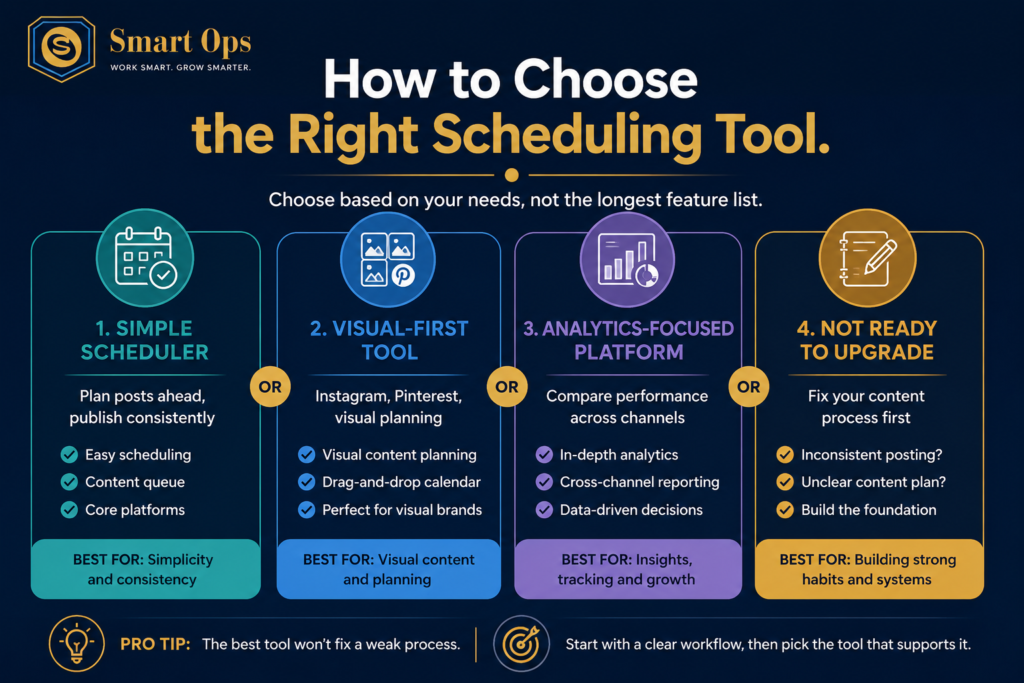
Which scheduler is best for me to automate social media posting?
Choose a simple scheduler if…
You mainly need to:
- Plan posts ahead
- Maintain a content queue
- Publish consistently
- Manage a few social platforms
You probably don’t need a complicated social media management system.
Choose a visual-first tool if…
Your content strategy depends heavily on:
- Visual content
- Content calendars
- Visual planning
The ability to see how your content will appear can be more valuable than having dozens of advanced features.
Choose an analytics-focused platform if…
You need to:
- Compare performance across channels
- Track content more closely
- Understand which topics generate results
- Report on social media performance
In that case, stronger analytics may justify paying for a more comprehensive platform.
Don’t upgrade yet if…
Your real problem isn’t scheduling.
If you’re struggling to consistently create useful content, buying another tool won’t solve the underlying problem.
First establish the workflow.
Then automate the repetitive parts.
Software should support a good process—not compensate for the absence of one.
A Simple Social Media Automation Setup You Can Start With Today
You don’t need to automate everything at once.
Start small.
Your basic system
1. Create
Set aside time each week or month to create content in batches.
2. Adapt
Turn each core idea into the formats appropriate for your main platforms.
3. Schedule
Put routine content into your scheduling tool.
4. Engage
Set aside regular time to respond, participate and stay aware of what is happening.
5. Review
Look at your results and use what you learn to improve the next batch.
That’s enough to create a meaningful improvement in consistency without turning your social media presence into a machine — this is really all it takes to automate social media posting without losing what makes it worth reading.
And as your business grows, the same principle can be applied to other repetitive processes.
Final Thought: Automate the Mechanics, Keep the Human Connection
Learning to automate social media posting well isn’t about disappearing from your audience. The best business automation doesn’t make people disappear.
It gives people better things to do.
For social media, that means letting software handle the predictable publishing work while you keep control of the things that make your content worth following in the first place: your perspective, your judgment, your stories and your relationships.
Scheduling content in advance doesn’t mean disappearing from your audience.
Done well, it can give you more space to actually show up.
Automate the mechanics. Keep the human connection.
And if you’re looking at automation more broadly, the same principle applies beyond social media: start with the repetitive task, build a simple process around it, and then use technology to remove unnecessary manual work. Our comparison of the 5 best business automation tools for small businesses is a good place to see that principle applied elsewhere.
Once your content is flowing on a schedule, the next repetitive task worth automating is usually how you organise the work itself — our breakdown of free vs paid project management tools covers exactly that.
Affiliate disclosure: Some links in this post are affiliate links. If you make a purchase through them, Smart Ops may earn a commission at no extra cost to you.
Leave a Reply