Affiliate disclosure: This post contains affiliate links. If you make a purchase through them, Smart Ops may earn a commission at no extra cost to you.
Why solopreneurs need a CRM too
Choosing the right CRM software for solopreneurs isn’t about managing a sales team — it’s about not losing track of the relationships that keep your one-person business running. If you’re running a business on your own, “CRM” might sound like something built for enterprise sales teams with dashboards and quotas — not for you. But the moment you’re juggling more than a handful of leads, clients, and follow-ups in your inbox or a spreadsheet, things start slipping. A missed follow-up. A client you forgot to invoice. A lead who went cold because you didn’t reach back out in time.
I’ve seen this play out — a single missed email, a follow-up that slipped through the cracks, and suddenly something time-sensitive is at risk. It’s not about carelessness; it’s about not having a system built to catch what a busy calendar can’t. This guide breaks down the best CRM software for solopreneurs — no enterprise complexity, no bloated setup, just what actually works at your stage.
A CRM isn’t about managing a sales team. For a solopreneur, it’s about not losing track of the relationships that keep your business running — without needing a second brain to remember who needs what, and when. The payoff is real too — CRM adoption is linked to an average return of $8.71 for every $1 invested, once it’s properly set up and actually used.
Why generic “enterprise” CRMs often fail solopreneurs
Most CRM software was built with enterprise sales teams in mind — multiple pipelines, layers of permissions, custom reporting dashboards. For a solopreneur, that’s not a feature, it’s friction. You end up paying for capacity you’ll never use, and spending hours in setup you don’t have time for.
The tools below were chosen because they scale down well — usable in an afternoon, without a training manual.
What to look for in a CRM as a solopreneur
Before comparing tools, here’s what actually matters at this stage:
- Ease of setup — you should be tracking your first lead within an hour, not a week
- Price that matches your revenue stage — free or low-cost tiers that don’t force an upgrade too early
- Light automation — reminders, follow-up nudges, and simple workflows, not a full automation engine
- Integrations — with your email, calendar, and whatever invoicing tool you already use
- Data portability (easy export) — can you easily export your contacts to a CSV file if you decide to change platforms down the road? Avoid tools that trap your data.
In my experience, the real definition of value for money is automation priced for where your business actually is, working seamlessly with the tools you already use. Get that combination right, and the time you claw back from mundane-but-necessary tasks can feel almost too good to be true.
The 5 best CRM software for solopreneurs in 2026
Here’s a quick snapshot of how these 5 tools compare on pricing, best use cases, and standout features before we dive into the details.
| Tool | Best For | Entry Price | Standout Feature |
|---|---|---|---|
| HubSpot | Scalability | Free tier | Robust free contact & deal tracking |
| Monday.com | Visual workflows | ~$36/mo (3-seat min) | Board/Kanban style task & lead view |
| Pipedrive | Active sales | $14/user/mo (14-day trial) | Focus on visual sales pipelines |
| Zoho CRM | Full-suite budget | Free tier (up to 3 users) | Integrates into a massive app ecosystem |
| Notion | Early-stage DIY | Free | Total database customization |
1. HubSpot CRM
HubSpot CRM is one of the most accessible entry points for CRM software for solopreneurs — its free tier is unusually generous for a tool this well-known — contact management, deal tracking, and email integration without a credit card. It’s a strong starting point if you want room to grow into paid marketing and sales tools later without switching platforms.
Best for: solopreneurs who expect to scale into a small team within a year or two. Pricing: Free tier available; paid plans scale with added features. 👉 [Get started with HubSpot’s Free CRM tools]
Watch out for: paid tiers scale up rapidly in cost once you step outside the free tier features.
2. Monday.com CRM
Monday.com built its CRM on top of its well-known visual board interface, which makes it feel less like “software” and more like a flexible task tracker that happens to manage clients too. If you already think in boards and columns, this will feel immediately familiar.
One honest note for solopreneurs specifically: Monday.com requires a 3-seat minimum, even for a single user. So while the headline price is $12/seat/month (billed annually), the real entry cost works out closer to $36/month — worth factoring in before you commit.
Best for: solopreneurs who want a highly visual, customizable layout over a traditional CRM feel, and don’t mind the seat-minimum pricing structure. Pricing: Starts at $12/seat/month (billed annually), with a 3-seat minimum — roughly $36/month in practice. 👉 [Test Monday.com’s visual CRM templates for free]
Watch out for: essential features like native email integration and automated follow-ups are reserved for the Standard and Pro tiers — so if automated workflows are a priority, budget for higher tiers beyond the entry-level plan.
3. Pipedrive
Pipedrive is built specifically around the sales pipeline — visually tracking where each deal sits, from first contact to close. For a solopreneur doing their own selling, this clarity is useful: you always know exactly what to follow up on next.
Best for: solopreneurs actively selling and needing pipeline clarity. Pricing: Starts at $14/user/month (billed annually); no free plan, but a 14-day free trial is available with no credit card required. 👉 [Try Pipedrive free for 14 days (no credit card required)]
Watch out for: no permanent free plan; requires a paid subscription after the trial.
4. Zoho CRM
Zoho is the budget-conscious, all-in-one option — CRM sits inside a much broader suite (invoicing, email, project tools) if you ever want to consolidate. For solopreneurs who want one ecosystem rather than five subscriptions, this is worth a serious look.
Best for: solopreneurs who want a CRM that can grow into a full operating system for the business. Pricing: Free tier available for up to 3 users; paid plans start at $14/user/month (billed annually) on the Standard tier. 👉 [Get started with Zoho CRM for free (up to 3 users)]
Watch out for: because Zoho is packed with features, the interface prioritizes utility and deep functionality over ultra-minimalist design — so expect a slight learning curve at first.
5. Notion (as a lightweight CRM)
Not a dedicated CRM, but for very early-stage solopreneurs, Notion’s flexible database structure can function as a simple client tracker — names, deal stage, next follow-up date, notes — all in one page you already use for everything else.
Best for: solopreneurs just starting out who aren’t ready for dedicated CRM software yet. Pricing: Free tier is generous; paid plans for larger teams. 👉 [Build your CRM in Notion for free]
Watch out for: requires manual setup and lacks native features like automated email tracking out-of-the-box.
Which CRM software is right for you?
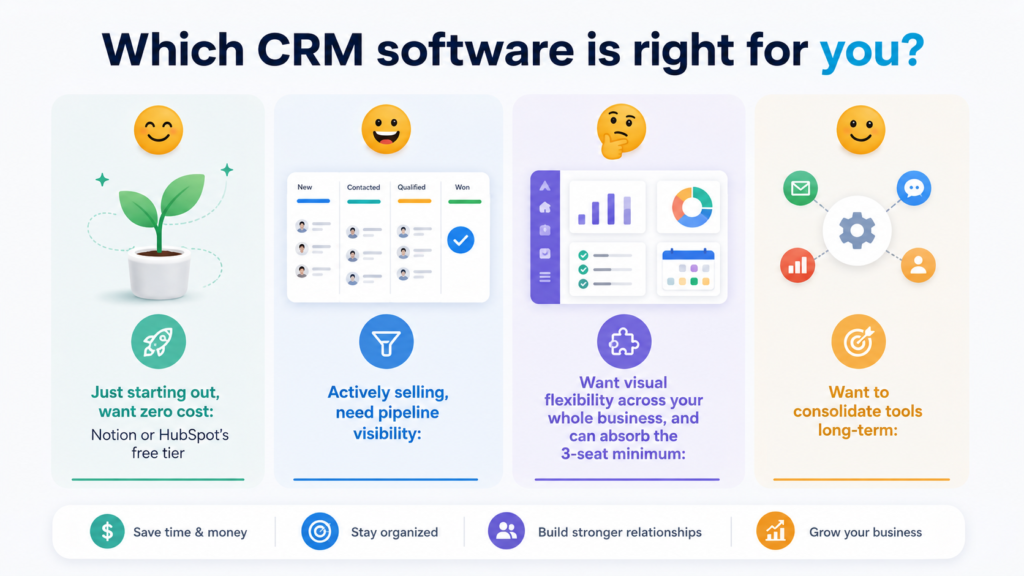
The right choice among the best CRM software for solopreneurs is a personal one, but these four considerations apply to any enterprise.
- Just starting out, want zero cost: Notion or HubSpot’s free tier
- Actively selling, need pipeline visibility: Pipedrive
- Want visual flexibility across your whole business, and can absorb the 3-seat minimum: Monday.com
- Want to consolidate tools long-term: Zoho
Start simple — pick one and commit this month
The biggest mistake solopreneurs make when choosing CRM software for solopreneurs isn’t picking the ‘wrong’ one — it’s never picking one at all, and letting client relationships live in scattered notes and email threads instead. Pick the tool that matches where you are right now, not where you hope to be in two years. You can always switch later; what you can’t get back is the leads you lost track of while deciding. The right CRM software for solopreneurs is the one you actually start using.
Ready to automate the rest of your workflow too? Our comparison of the top business automation tools for small businesses covers what to pair with your new CRM once it’s up and running. Managing the tasks themselves is just as important as managing the relationships — see our comparison of free vs paid project management tools to round out your toolkit.”
Affiliate disclosure: Some links in this post are affiliate links. If you make a purchase through them, Smart Ops may earn a commission at no extra cost to you.
Leave a Reply